
How To Use NES Codes on MesenCE
Mesen CE is an Emulator that you can use for the original NES system. In my experience this emulator is a bit easier to use than Nestopia when it comes to codes. It has a more clear and obvious format for inputting codes and it also comes with a built in Cheat Database which has codes already loaded into the Emulator for you to use.
For the purposes of this guide we'll be using The Legend of Zelda (USA) (Rev 1 aka Version 1.1). Even though the game is marked as (Rev 1), many of the codes from the original version will work with this one. It varies from game to game but sometimes not much changes between Version 1.0 and Version 1.1 which means that many of the codes will work on both versions.
To get started you'll want to click on Tools at the top of Mesen CE and select Cheats from the drop down. Before you input your own codes, you should select Cheat Database at the top of the window and then choose your game from the new pop up box. This will automatically load any cheats that are already saved for this game in the Emulator (pictured below).
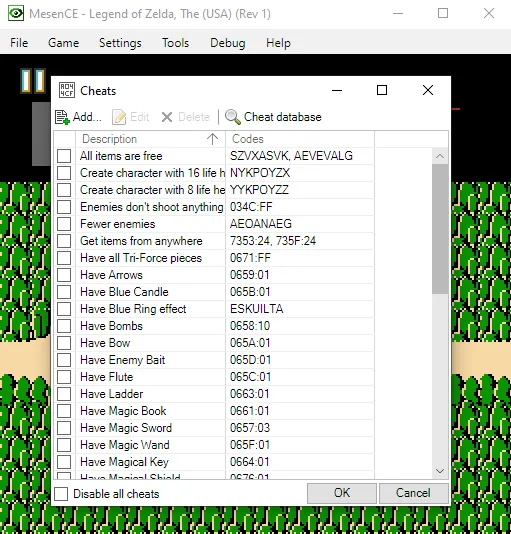
As you can see the Emulator already comes with a decent selection of cheats for The Legend of Zelda. One thing you may also notice is that it has Raw cheats available too, which is something that's harder to get working on Nestopia. The cheat we want to use isn't part of this list though, so we're going to input that as a new one.
Start Game with All Items, Maxed out Bombs, Keys and Money: PAEZYTAA
When you're ready to input a new cheat click the Add... button in the top left of the window to make the box shown below appear.
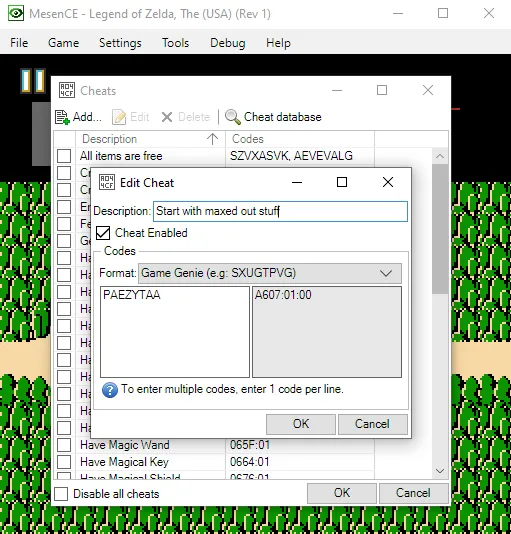
Input the name of the code into the Description box and then put the actual code into the box on the bottom left. My code is a Game Genie code so I selected that from the Format drop down box. If your code is a Raw/Action Replay code you'll want to select Custom from the Format drop down instead. Unlike with the Nestopia Emulator, you don't need to input a Compare value when using Raw codes with this Emulator.
Another benefit of MesenCE is that when using a code that takes up multiple lines, you don't have to input each line individually. Whereas with Nestopia you'll have to input each line as an individual code, there is no such restrictions with Mesen. Now that we've gone over all that and input our code the final question is, does it work?
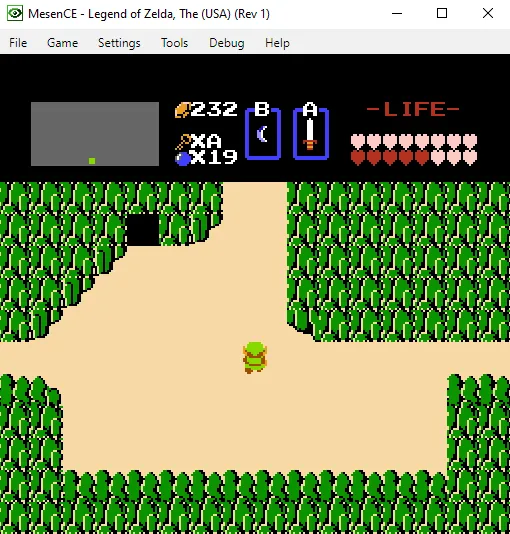
In the picture above we have max life, keys, bombs (almost) max money and an item in both B and A slots. I'd say the code is definitely working!
Common Issues With NES Codes
So, if you're having an issue making an NES code work there are a few common solutions you can do to change that... The first and most common solution is to reset your Emulator/Console. Especially when it comes to Game Genie codes, they will often not take effect until you reload the game with them enabled.
You could try forcing the memory address to update too, for example, if you're using a code that is supposed to give you infinite life... Try taking damage first to see if it activates. Sometimes codes will kick on whenever the value changes that they're referencing. If these things don't work for you, try checking to make sure the version of your game matches with the codes on my website or other websites. Sometimes games will have (Rev 1) in their name, kinda like The Legend of Zelda does in the pictures above.
Rev 1 basically means Version 1.1 which is a revision of the original game. Normally companies release revisions to fix common bugs or issues, when they do this not every memory location is changed. What that means is codes that worked on the Version 1.0 can still work on Version 1.1, you just need to test them out and see if they do.
Despite all of this, sometimes you'll still find a bunk code that just refuses to work for you. Sometimes this is a compatibility issues with the Emulator and sometimes it's just a code that someone uploaded without thoroughly testing.