
How To Use Saturn Codes on Mednafen
The Mednafen Emulator is a command line Emulator which basically means it has no user interface to help you out. It's all going to be text entries and that's going to raise the difficulty level for most users. In this guide I will do my best to explain how to use codes on this Emulator through examples.
If you find this too complicated, you can always use Kronos for Saturn instead, but admittedly that's a very inferior option. When you're ready to get started, press Alt + C to open the cheat window. This whole process is command based, you will be copy and pasting or typing into the window each time. First, we'll go through the process line by line and I will explain them. After that I will give you some examples. When you press Alt + C for the first time it's going to give you 3 options...
1) List Cheats
2) Cheat Search...
D) Display Menu
Press 2 and hit enter to bring up a new list...
1) Add Cheat
2) Reset Search
3) Do Search
4) Set Original to Current
5) Unhide Excluded
6) Show Results
D) Display Menu
X) Return to Previous
For the purposes of this guide we just need 1, Add Cheat. The next thing it'll ask is Name[ ]: which is the name of the code you want to use. It really doesn't matter what you put in, just use something that will help you remember what code you're using. I always input the name of the code. After you hit enter you'll get the next prompt which can be a bit confusing if it's your first time.
Available types:
R - Replace/RAM write(high-level).
A - Addition/RAM read->add->write(high-level).
T - Transfer/RAM copy(high-level).
Type [R]: For this prompt you can press R and hit enter or just hit enter and skip it.
The next line is the first time we're going to be inputting part of the code, the prompt will say Address [$00000000]: .. So for this example I am going to be using a cheat from Resident Evil on the Saturn. The code is 102F8784 0AFF; so for this part we ONLY need the first letters/numbers that appear before the space. That means 102F8784 is the address, however, we need to add a $ infront of it first. So when you input the address into Mednafen you'll want to input it as $102F8784
Next you'll be asked Byte length(1-8); this is a difficult one to explain in a short amount of time. For the majority of codes you'll be using 1 or 2 and there won't be much past that outside of esoteric situations. Byte length 1 is for a max value of 255, #2 is for a max value of 65,535. According to what I read online, that's 2 for an address starting with 0 or 1, but it would be 1 for an address starting with 3.
Big endian? [Y] is the next thing you're asked, for Sega Saturns this is always a Y answer.
Value [000]: Last but not least, we need to input the value that we want to change it to. In this example, $102F8784 is the memory address, the value is going to be 0AFFh. How this works is, $102F8784 is telling the Emulator what memory location to change and 0AFF is saying how to change it/what to change it to.
Note: According to what I found online you should be putting an h after the value so 0AFFh when you input it into Mednafen. Some cheats have worked for me without the h, but if the cheat isn't working for you try it with the h (or just always use the h)
The next two prompts will ask you to save the code then enable it, choose whatever you want. Before we move on, I have a picture below of the exact instructions I gave above and what they look like when input into the Emulator. Some people may wanna see what it actually looks like step by step so, there you go.
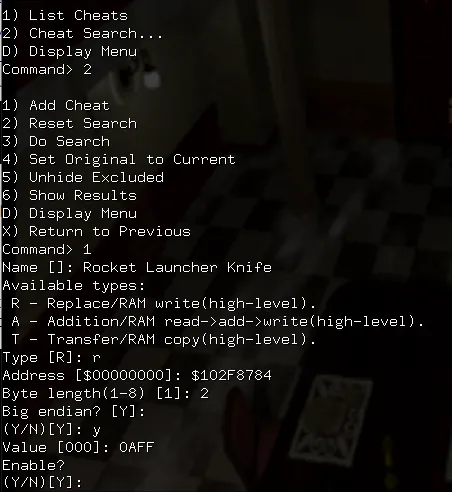
When I input the value for this code (0AFF) I didn't use an h at the end. The code still worked, but common practice is to use an h.
Last thing before we move on, all of the instructions I gave above condensed down into an easy to process format. Once you break it down step by step it's actually pretty easy to input codes on this Emulator.
1. Press 2 to bring up the Cheat Search.... Menu
2. Press 1 for 1) Add Cheat
3. Input the Name[]: that you want for the cheat
4. When you reach Type[r] just hit enter to skip this part, it'll default to R
5. Place a $ in front of the Address like it shows, for this part you need to input the first part of your code (the last four letters/numbers come later)
6. Big endian? [Y] Press y and hit enter, Sega Saturn requires this
7. Finally, you'll be asked for the Value [000], this is the final four letters/numbers of your code. You'll want to put a lowercase h after you input the value. This matters for some codes, other codes I don't think it matters for. Use it anyway.
Mednafen Cheat Example
The first example I will give you is the one that helped me solve the puzzle so to speak. Here is the post with a simple explanation for how to setup the codes properly. Below you'll find the code (3 lines in total) with the explanation that was given on the post.
160BEED6 ???? (Replace ???? with 4100 -double experience or 4108 -x4 exp)
160BEEDA 8BFF
160BEEDC 321C
Type [R]: press enter, it's always replace for those cheat codes
Address [$00000000]: $160BEED6 (the $ at the start matters)
Byte length(1-8) [1]: 2 (that's 2 for an address starting with 0 or 1, but it would be 1 for an address starting with 3)
Big endian? [Y]: press enter, it's always big endian values on Saturn
Value [000]: 4100h (the h at the end matters)
160BEED6 4100 is the first line of the code and what is being entered above.
Power Slave Cheat Example
Another example I will give you involves the game Power Slave for Sega Saturn. The code we'll be using for this part of the guide is Unlimited Pistol Ammo. Below is a screenshot of the exact process I followed when inputting the code.
Unlimited Pistol Ammo: 16086096 003C
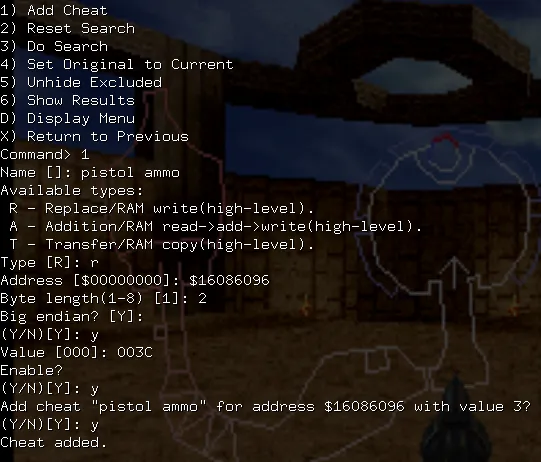
1. Press 2 to bring up menu
2. Press 1 for Add Cheat
3. Input the Name[]: pistol ammo
4. Type[r] I pressed R then hit enter
5. Place a $ in front of the Address like it shows, so I did $16086096
6. Big endian? [Y] Press y and hit enter, Sega Saturn requires this
7. Finally, you'll be asked for the Value [000], this is the final four letters/numbers of your code (003C). You'll want to put a lowercase h after you input the value. This matters for some codes, other codes I don't think it matters for. Use it anyway. I didn't in the picture above any my code still worked so there's a little wiggle room.