How To Use Saturn Codes on Kronos
This guide covers how to use codes on the Kronos Emulator when playing Sega Saturn games. Before we get started I feel that I must mention that Saturn is a notoriously difficult system to emulate and it's very obvious when using the emulator. You will notice graphical glitches between screens and various other artifacts when playing. Using codes can make the stability of this Emulator even worse, so keep that in mind. Unfortunately, Kronos is the easiest to use Emulator for Saturn but it also seems to be the least stable.
For the purposes of this guide we'll be using Resident Evil as an example game for codes that we test.
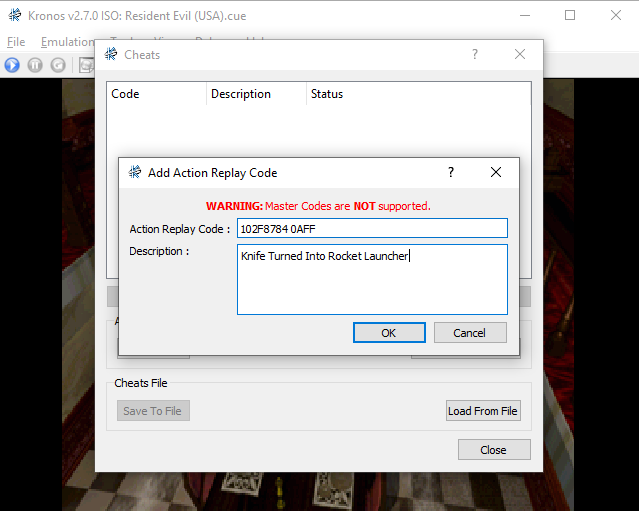
When you're ready to input your code, at the top of Kronos click on the Tools button then click on Cheats List. This will bring up a new window, in that window you'll want to click the Action Replay button which brings up another window (shown below).
Click to enlarge this image
As it says, you'll want to input the code into the top box and the description into the bottom. We're using Knife Turned Into Rocket Launcher (the code below) with this guide. You can see how I input the code in the picture above, just do yours the same way.
Knife Turned Into Rocket Launcher: 102F8784 0AFF
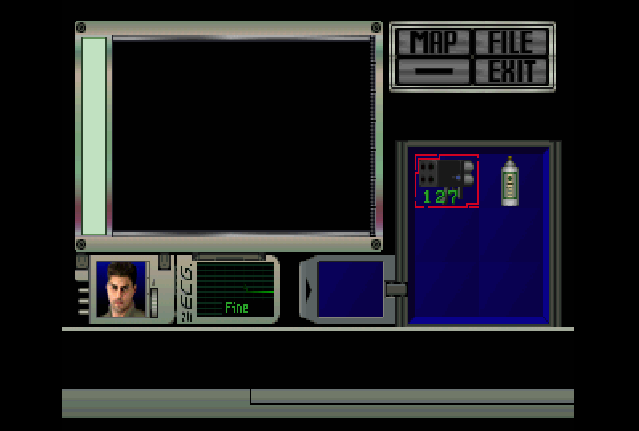
Once you've hit Ok you'll see your code in the list, hit close to go back to your game. Now it's the moment of truth, we need to see if our code actually worked! Since we used Knife Turned Into Rocket Launcher, we'll need to open our inventory and see if our knife is a Rocket Launcher. As you can see in the screenshot below, our knife is indeed a Rocket Launcher.