
How To Use GBA, GBC and GB Codes on mGBA
This guide will walk you through how to use codes on the mGBA Emulator. I made this for GBA but you can use these same steps for Game Boy and GBC as well; this Emulator works well for all 3 consoles. If you have an older version of mGBA and for some reason can't upgrade it... Check out my mGBA 0.5.0 How To Use Codes Guide.
For the purposes of this guide I will be using codes on Final Fantasy 6 as an example to show you how to set up codes.
When you're ready to get started, at the top of the mGBA window click on Tools and then click Cheats in the drop down. This will bring up the window that's shown below. From here, all you need to do is put the cheat into the box on the right hand side that says "Enter codes here..." and then click Add New Code at the top of the window. This will make your box look like the screenshot below.
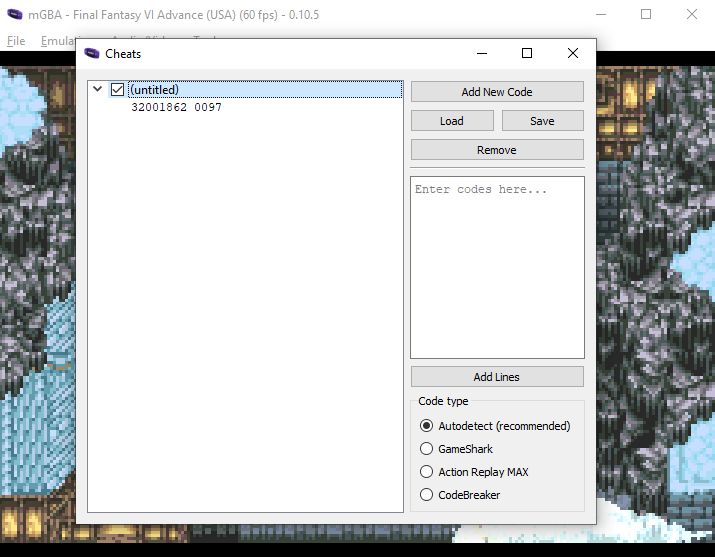
Click to enlarge this picture
The code I am using as an example for this guide is Unlimited Gil, I posted it below this paragraph. As you can see when we enter the code into the Emulator it doesn't name it, so you'll have to double click on (untitled) and give it a name. I recommend you do this so you know what codes are which in the future.
Unlimited Gil: 32001862 0097
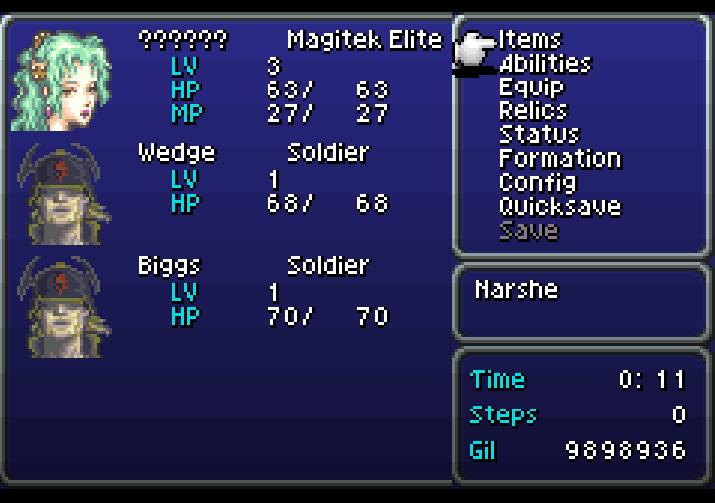
Once you've input your code all that's left is to return to the game and check to see if it is working. Below is a picture of my inventory window and as you can see I have 9million Gil which, I would say, definitely means it's working.
If you'd like to save your codes and use them the next time you launch mGBA you may want to click the Save button under the Add New Code button. This will let you save a text file of your codes which makes it easier to load them when you want to use them.